Image Generation
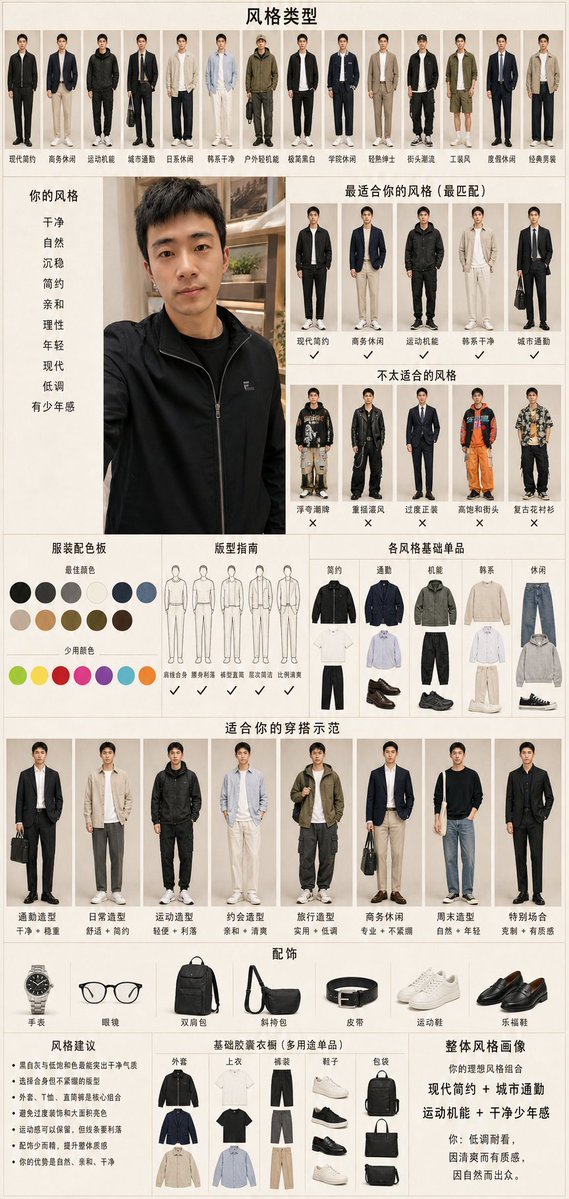
Men's Fashion Style Diagnosis Report
{"type":"vertical personal menswear style diagnosis infographic poster","language":"Chinese text on the poster","overall_style":"clean Xiaohongshu fashion consultant report, beige paper background, thin grid lines, editorial catalog layout, realistic full-body outfit cutouts, neutral lighting, neat typography, high information density","canvas":{"orientation":"portrait","aspect_ratio":"9:16","background":"warm off-white beige with subtle texture","title":"风格类型"},"source_photo_panel":{"position":"left center","content":"large casual selfie portrait of a young East Asian man with short black hair wearing a black zip jacket, face anonymized with a soft rectangular blur, indoor bookshelf background","adjacent_style_keywords":{"title":"你的风格","count":9,"labels":["干净","自然","沉稳","简约","亲和","理性","年轻","现代","低调","有少年感"]}},"layout":{"sections":[{"title":"风格类型","position":"top full width","count":14,"description":"fourteen small full-body male outfit archetypes in a row, each with a Chinese label","labels":["现代简约","商务休闲","运动机能","城市通勤","日系休闲","韩系干净","户外轻机能","极简黑白","学院休闲","轻熟绅士","韩系通勤","工装风","皮质休闲","经典男装"]},{"title":"最适合你的风格(最匹配)","position":"upper right","count":5,"description":"five recommended full-body outfit thumbnails with check marks underneath","labels":["现代简约","商务休闲","运动机能","韩系干净","城市通勤"]},{"title":"不太适合的风格","position":"middle right","count":5,"description":"five unsuitable outfit thumbnails with X marks underneath","labels":["潮奢街牌","重摇滚风","过度正装","高饱和街头","复古花衬衫"]},{"title":"服装配色板","position":"middle left","count":19,"description":"color palette with 12 main neutral/deep color swatches and 7 accent-color swatches","labels":["黑色","深灰","灰色","米白","海军蓝","深蓝","浅卡其","驼色","棕色","军绿","深棕","咖啡色","少量颜色:荧光绿","亮黄","珊瑚红","洋红","紫色","青色","橙色"]},{"title":"版型指南","position":"middle center","count":6,"description":"six simple line drawings of male silhouettes with recommendations","labels":["清瘦合身","肩部利落","线条直筒","宽松适度","比例清爽","避免臃肿"]},{"title":"各风格基础单品","position":"middle right","count":5,"description":"five columns of capsule wardrobe items, each column showing tops, bottoms, shoes, and accessories","labels":["简约","通勤","机能","韩系","休闲"]},{"title":"适合你的穿搭示范","position":"lower middle full width","count":8,"description":"eight full-body outfit examples for the subject, each with a style name and short trait description","labels":["通勤造型","日常造型","运动造型","约会造型","旅行造型","商务休闲","周末造型","特别场合"]},{"title":"配饰","position":"lower left-middle","count":7,"description":"seven accessory product icons in a row","labels":["手表","眼镜","双肩包","斜挎包","皮带","运动鞋","乐福鞋"]},{"title":"风格建议","position":"bottom left","count":6,"description":"six bullet-point styling suggestions in Chinese","labels":["黑白灰与低饱和色最能突出干净气质","选择合身但不紧绷的版型","外套、T恤、直筒裤是核心组合","避免过度装饰和大面积亮色","运动感可以保留,但线条要利落","配饰少而精,提升整体质感"]},{"title":"基础胶囊衣橱(多用途单品)","position":"bottom center","count":6,"description":"six categories of wardrobe essentials displayed as small product cutouts","labels":["外套","上衣","裤装","鞋子","包袋","配饰"]},{"title":"整体风格画像","position":"bottom right","count":1,"description":"summary text block describing the ideal personal style combination","labels":["你的理想风格组合:现代简约 + 城市通勤 + 运动机能 + 干净少年感;你:低调耐看,因清爽而有质感,因自然而出众。"]}]},"visual_requirements":"Use realistic male fashion model cutouts, accurate clothing proportions, tidy alignment, consistent beige borders, small Chinese captions, check marks and X symbols where indicated, no clutter beyond the report layout. Make the image look like a comprehensive personal fashion style analysis report generated from a selfie.","customization":{"preferred_style":"modern minimalist urban commute with sporty functional details","color_mood":"low-saturation neutrals: black, gray, navy, beige, olive, brown","summary_quote":"低调耐看,因清爽而有质感,因自然而出众。"}}