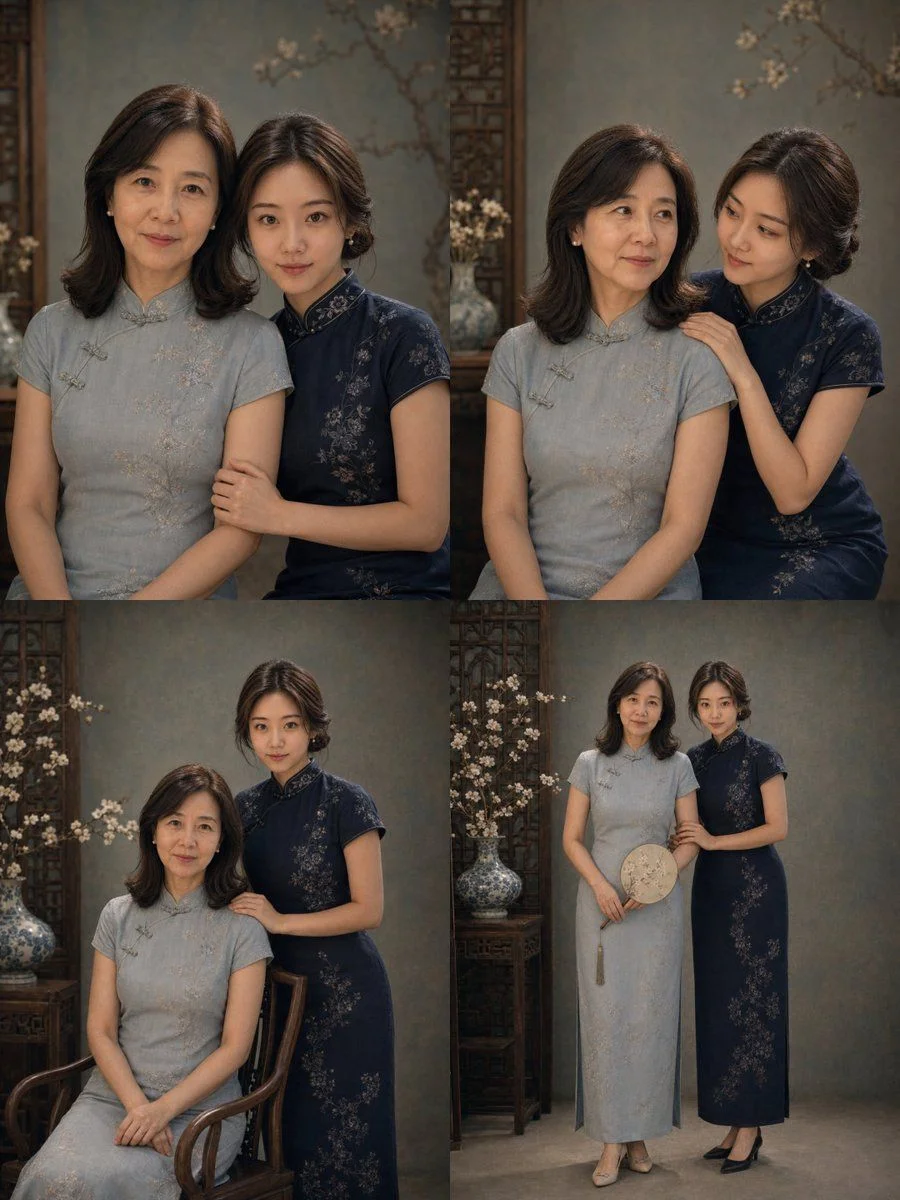
How to Create a Retro Cheongsam Mother-Daughter Portrait with GPT Image 2
In this guide, we will walk you through the process of generating a 2×2 four-grid mother-daughter portrait puzzle with the theme 'Retro Cheongsam Mother-Daughter Portrait' using GPT Image 2.
Step 1: Prepare the Input Photos
- Upload two real female photos of the mother and daughter to the GPT Image 2 platform.
- Ensure the photos are clear and well-lit, with a good balance of lighting and shadows.
Step 2: Set the Character and Style Settings
- Set the character settings to preserve the respective real identity features of the mother and daughter, including face shape, facial features, eyes, nose, lips, skin tone, age, hairstyle, and overall temperament.
- Set the mother to retain a natural sense of maturity and slight traces of time, with very shallow nasolabial folds.
- Set the daughter to maintain young, natural, and delicate characteristics.
- Choose the overall style as 'Retro Oriental cheongsam portrait', with a quiet, dignified, and gentle tone.
Step 3: Customize the Clothing and Hairstyle
- Set the mother to wear traditional cheongsams in low-saturation colors such as light green-gray, lake blue, or dark green.
- Set the daughter to wear improved cheongsams in coordinated colors like dark blue or navy.
- Choose hairstyles that are treated naturally based on original hair length, overall tidy with a Chinese-style updos or retro short hair styling.
Step 4: Select the Background and Texture
- Choose a gray-green, blue-gray retro studio background with slight canvas texture or wooden Chinese elements.
- Set the image to have soft studio light, with a low-saturation, high-end, delicate, and realistic tone.
Step 5: Generate the 2×2 Four-Grid Puzzle
- Generate a 2×2 four-grid puzzle, each grid is a 3:4 vertical composition.
- Ensure the style and color tones are unified, but with natural variations in expression, angle, and interaction.
Content Suggestions for the Four Grids
- Formal half-body photo looking at the camera.
- Intimate interaction close-up.
- Sitting and standing combined medium shot.
- Complete double portrait showing the cheongsam styling.
Conclusion
By following these steps, you can create a beautiful and unique Retro Cheongsam Mother-Daughter Portrait with GPT Image 2.
Remember to upload clear and well-lit photos, set the character and style settings, customize the clothing and hairstyle, select the background and texture, and generate the 2×2 four-grid puzzle.
With these guidelines, you can create a stunning mother-daughter portrait that captures the essence of the Retro Oriental cheongsam theme.
Try it out on GPT Image 2 today!