
Creating professional animations once required complex software and strong motion design skills. Tools like Adobe After Effects gave full control but also came with a steep learning curve.
Artificial intelligence is changing that process. Today, AI tools can generate motion graphics, animated text, and visual content automatically.
Swishy AI is one of the emerging platforms that focuses on AI-generated animations. It allows creators to turn simple ideas into animated visuals within seconds.
For content creators, marketers, and social media managers, this can dramatically reduce the time required to produce engaging content.
In this article you will learn what Swishy AI is, its main features, how it works, and whether it is worth using.
What is Swishy AI
Swishy AI is an AI animation generator that helps users create motion graphics and animated visuals using simple prompts.
Instead of manually building animations frame by frame, users describe what they want and the AI generates the animation automatically.
The platform is designed to simplify motion design so that beginners can create visuals without learning complex software.
Swishy AI is commonly used for
animated text content
social media visuals
logo animations
promotional graphics
video intros and outros
The goal of the tool is simple. It converts creative ideas into animated content within seconds.
Key Features of Swishy AI
Swishy AI offers several features designed to simplify the animation workflow.
AI Motion Designer
The AI motion designer automatically builds motion sequences based on your prompt.
Instead of creating keyframes manually, the system analyzes your description and generates a ready animation.
Example prompt
Create a modern logo reveal animation This type of automation helps creators produce animation content much faster.
AI Text Animation
Animated text is widely used in marketing and social media videos. Swishy AI can generate kinetic typography effects automatically.
Creators can simply describe the style of animation they want.
Example prompt
Animate the text The AI generates animated typography based on the prompt.
Animation Templates
Templates help users generate content quickly without designing everything from scratch.
Swishy AI offers templates for
logo reveals
social media posts
title animations
promotional graphics
video intros
Templates are especially helpful for beginners who want quick results.
Example prompt
Create a motivational animated quote template for social media using bright colors and smooth transitions.
Social Media Content Optimization
Short form content dominates modern social platforms. Animated visuals attract attention and increase engagement.
Swishy AI helps create animations designed for platforms such as
Instagram
TikTok
YouTube Shorts
LinkedIn
Creators can generate visual content that fits the format of these platforms.
Example prompt
Create a vertical animation Fast AI Generation
One of the biggest advantages of Swishy AI is speed.
Traditional motion graphics may take hours or even days to complete. AI animation tools can produce results within seconds.
This allows creators to generate multiple variations of animations quickly.
Example prompt
Generate a quick animated intro How to Use Swishy AI
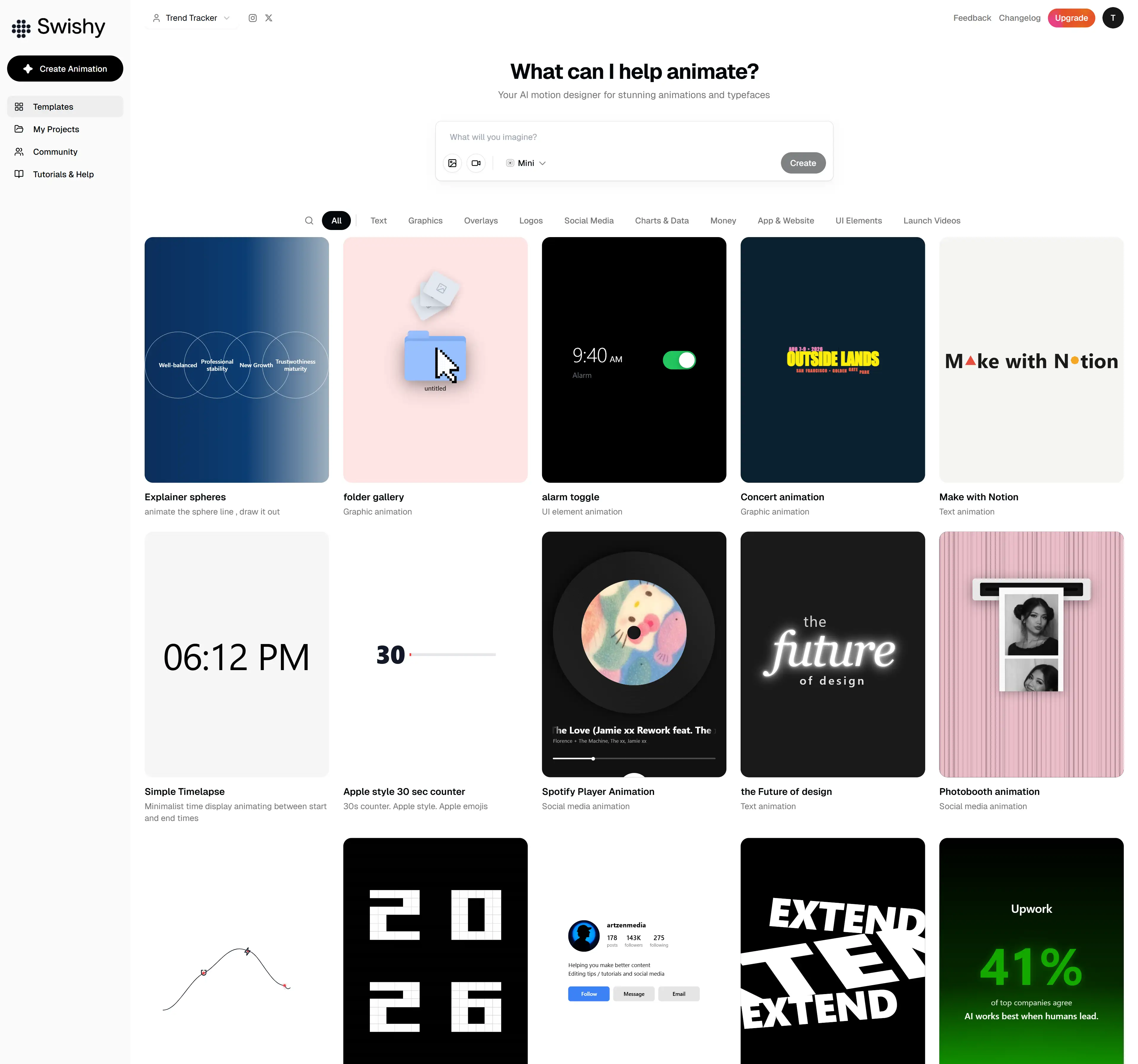
Using Swishy AI is straightforward and requires very little technical knowledge.
Step 1 Create an Account
Start by visiting the Swishy AI platform and signing up for an account.
After logging in, you will gain access to the animation generator and available templates.
Step 2 Enter Your Prompt
Next, describe the animation you want the AI to generate.
Example prompt
Create an animated Instagram post introducing a digital marketing course The AI reads your prompt and prepares the animation concept.
Step 3 Select Style or Template
Users can select templates or customize certain visual elements such as
typography
animation style
layout
motion speed
This step helps personalize the final animation.
Step 4 Generate the Animation
After setting the options, the AI generates the animation automatically.
The system creates motion sequences, transitions, and visual effects based on the prompt.
Example prompt
Generate a smooth animated intro for a productivity YouTube channel using minimal design and elegant motion.
Step 5 Export the Animation
Once the animation is generated, it can be exported in formats suitable for social media or websites.
Common export formats include
MP4
GIF
MOV
These formats allow creators to easily publish their animations online.
Swishy AI Use Cases
Swishy AI can be used in several creative and professional scenarios.
Social Media Content Creation
Content creators can use AI animations to produce engaging visuals for platforms like Instagram and TikTok.
Example prompt
Create an energetic animated Instagram reel promoting a morning fitness routine Animated content often performs better because it quickly captures attention.
Marketing and Advertising
Businesses can generate promotional animations for campaigns and advertisements.
Example prompt
Create a short promotional animation announcing a These visuals can be used for websites, ads, and social media marketing.
Educational Content
Animations help explain concepts more effectively than static images.
Example prompt
Generate an animated educational slide explaining the importance of cybersecurity using clear icons and smooth transitions.
Teachers and online educators can use such animations in videos and presentations.
Personal Branding
Creators building a personal brand often need visual content that looks professional.
Example prompt
Create a clean animated intro for a personal brand focused on productivity and digital entrepreneurship.
Animations can make personal content more visually appealing.
Swishy AI vs Traditional Animation Tools
Traditional animation software provides powerful tools but also requires time and experience.
Professional motion design software usually involves
complex timelines
manual keyframes
detailed editing processes
This allows full creative control but increases the difficulty for beginners.
Swishy AI simplifies the process by automating animation generation. Users only need to describe the desired result and the AI produces the animation.
For beginners and content creators who want quick results, AI tools can be much easier to use.
However, professional designers may still prefer traditional tools when they need precise control over every detail.
Pros and Cons of Swishy AI
Pros
Easy for beginners to use
Fast animation generation
No advanced motion design skills required
Helpful templates available
Great for social media content creation
Cons
Limited customization compared to advanced animation software
AI results depend on the quality of prompts
Professional designers may prefer manual animation control
Is Swishy AI Worth Using
Swishy AI is a useful tool for creators who want to generate animations quickly without learning complex motion design software.
It is especially helpful for
social media creators
digital marketers
entrepreneurs
educators
content creators
If your goal is to produce animated visuals quickly, AI animation tools like Swishy AI can significantly speed up your workflow.
Final Thoughts
Artificial intelligence is transforming the way digital content is created. Tools like Swishy AI make animation accessible to a much larger audience.
Instead of spending hours designing motion graphics manually, creators can now generate animations within seconds using simple prompts.
For marketers, creators, and businesses that regularly publish content, this type of automation can save time and improve productivity.
As AI tools continue to evolve, platforms like Swishy AI are likely to play an important role in the future of digital content creation.
