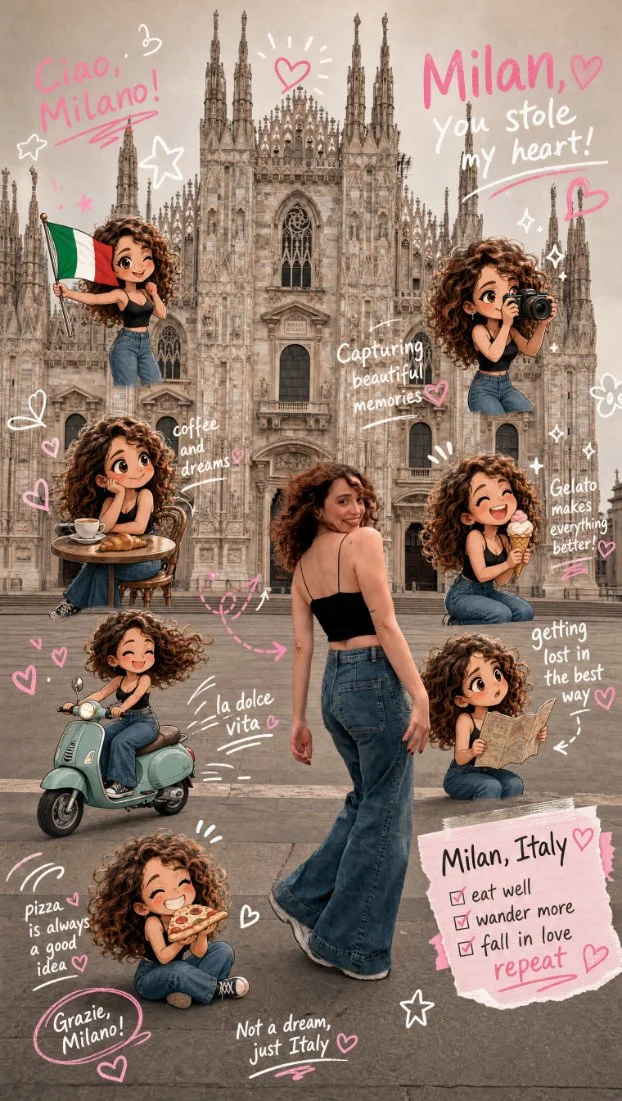
Chibi Scrapbook Photo Transformation: A Step-by-Step Guide
Step 1: Understanding the Prompt
The prompt requires the removal of people around the main character and the addition of multiple small, cute chibi-style "mini versions" of her in the image.
- Each mini character should have a big head, expressive facial features, and match her hairstyle and outfit.
- The mini characters should be depicted doing different vacation-related activities in Italy.
Step 2: Enhancing the Image with Scrapbook Elements
The image should be enhanced with playful, hand-drawn doodles and handwritten notes in white and pink ink, in a scrapbook style.
- Include elements like arrows, stars, hearts, sparkles, and sketchy lines.
- Add cute, handwritten vacation-themed phrases about Milan, Italy.
Step 3: Image Generation with GPT Image 2
Use GPT Image 2 to generate the transformed image based on the prompt specifications.
- Upload the original image to the GPT Image 2 platform.
- Apply the necessary transformations and enhancements as per the prompt.
- Download the generated image in the desired format.
Conclusion
The Chibi Scrapbook Photo Transformation is a creative way to enhance a vacation photo with playful and cute elements. By following the steps outlined above, you can create a unique and personalized image that captures the essence of your trip to Milan, Italy.
Visit https://chatgpt.com to explore more image generation capabilities and try out the Chibi Scrapbook Photo Transformation for yourself.